Breaking down the new Sessions Screen

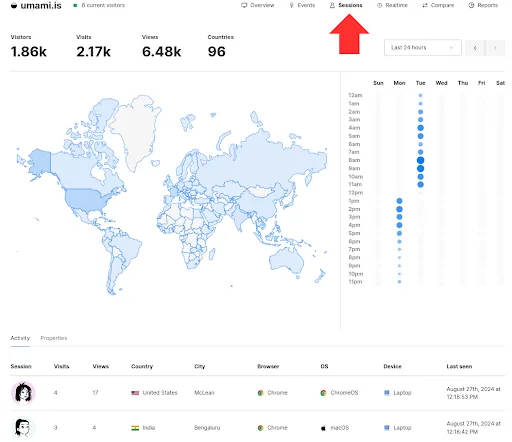
As part of the latest release of Umami, v2.13.0, we are introducing a new screen called Sessions. The purpose of the new report is to make analyzing session data, analyzing user behavior, and spotting traffic patterns significantly easier.
Also, just below the main Sessions report, you will see new features called Activity and Properties. Activity is a stream of all of the sessions happening grouped by user. Directly next to the Activity tab is the Properties tab. We're introducing support for saving session data, which works similarly to custom event data and opens up new possibilities for user tracking and analysis.
Session Report Features
The Sessions report offers several features designed to give you a more nuanced understanding of your traffic:
- Weekly Session Breakdown: The report visually represents session data by day and hour. Using blue circles, you can quickly identify high-traffic periods (larger circles) and low-traffic periods (smaller circles) throughout the week.
- Hourly Traffic Breakdown: This feature shows you an hourly traffic breakdown during a week, allowing you to pinpoint your website or app's busiest times. For example, if you spot a large blue circle Monday at 2:00 p.m., that means there is a traffic spike and potentially an area to drill into more using other Umami reports.
- Activity Tab: If you scroll down from the main report, you'll find the Activity tab. This tab displays a real-time data stream of sessions and each user has a profile.
- User Profiles: By clicking on any avatar in the activity stream below the report, you can access a detailed page about that particular visitor, including their activity history over time.
- Properties Tab: Next to the Activity tab, you'll find the new Properties tab. This tab displays saved session data that you've saved using the new session data saving feature.
- Save Session Data: We've introduced support for saving session data, opening up new user tracking and analysis possibilities. This feature works similarly to custom event data, allowing you to store and analyze more detailed user information. You can now use the identify function from the tracker script to save data about the current session; that data will appear in the new Properties tab.
For example:
umami.identify({ email: '[email protected]' });
How to Use the Sessions Report
The Sessions report is designed to be user-friendly and easily accessible. Here's how you can start using it:
- Log in to your Umami Cloud account
- Navigate to the Websites section
- Select the Sessions report
From here, you can:
- View the weekly and hourly breakdown of your session data
- Analyze traffic patterns across different days and times
- Scroll down to access the Activity and Properties tabs
- Click on visitor avatars to view detailed profiles
- Implement session data saving for more in-depth user analysis
Saving Session Data
To take full advantage of the new session data-saving feature, you can use the identify function from the tracker script. This allows you to save custom data about the current session.
This saved session data will appear in the Properties tab and in each user profile, providing deeper insights about your users.
Use Cases for the Sessions Report
Here are some use cases that demonstrate how different teams can use the Sessions screen:
Content Strategy Optimization
Your content team can use the hourly traffic breakdown to identify peak engagement times, which can help inform future content releases. For instance, if you notice a surge in traffic every weekday at 9 AM, consider publishing your most important content before this time to catch the wave of user activity.
Server Resource Management
For dev and ops teams, the weekly session breakdown provides insights for resource allocation. By identifying high-traffic periods, you can ensure your servers are prepared to handle increased loads. This proactive approach can help prevent slowdowns or outages during crucial periods of user activity.
Personalized User Experience
Marketing and product teams can leverage the new session data-saving feature to create more personalized experiences. By saving and analyzing user-specific data in the Properties tab, you can tailor your website's content, offers, or functionality to individual users. For example, if a user has shown interest in a particular product category, you could use this information to display relevant recommendations on their next visit. Or, sync up with the sales team and let them know which customers or prospects are potentially interested in what.
User Journey Analysis
Product managers and UX designers can use the visitor profiles feature and the Activity tabto understand individual user journeys better. By examining the activity history of specific users, you can identify common paths through your website, potential pain points, and opportunities for improvement in your user experience design.
Real-Time Engagement Monitoring
Using the Activity tab, your team can monitor user engagement in real time. This can be useful during product launches, marketing campaigns, or when troubleshooting issues.
The Sessions report can be helpful in a range of ways for a range of teams. Whether optimizing content strategy, managing server resources, personalizing user experiences, or refining your product design, the Sessions report offers the insights you need to make data-driven decisions.
Have questions about the new Sessions report or need help implementing session data saving? Don't hesitate to reach out to our support team at [email protected]. We're here to help you get the most out of Umami!