How Umami Does Customer Journey Analytics
Knowing how a user navigates through your product is everything. This information can help optimize conversions, steer your product roadmap, and inform other key decisions. Umami's Journey report allows product teams to map out and analyze the steps visitors take to achieve their goals, such as making a purchase or signing up for a newsletter.
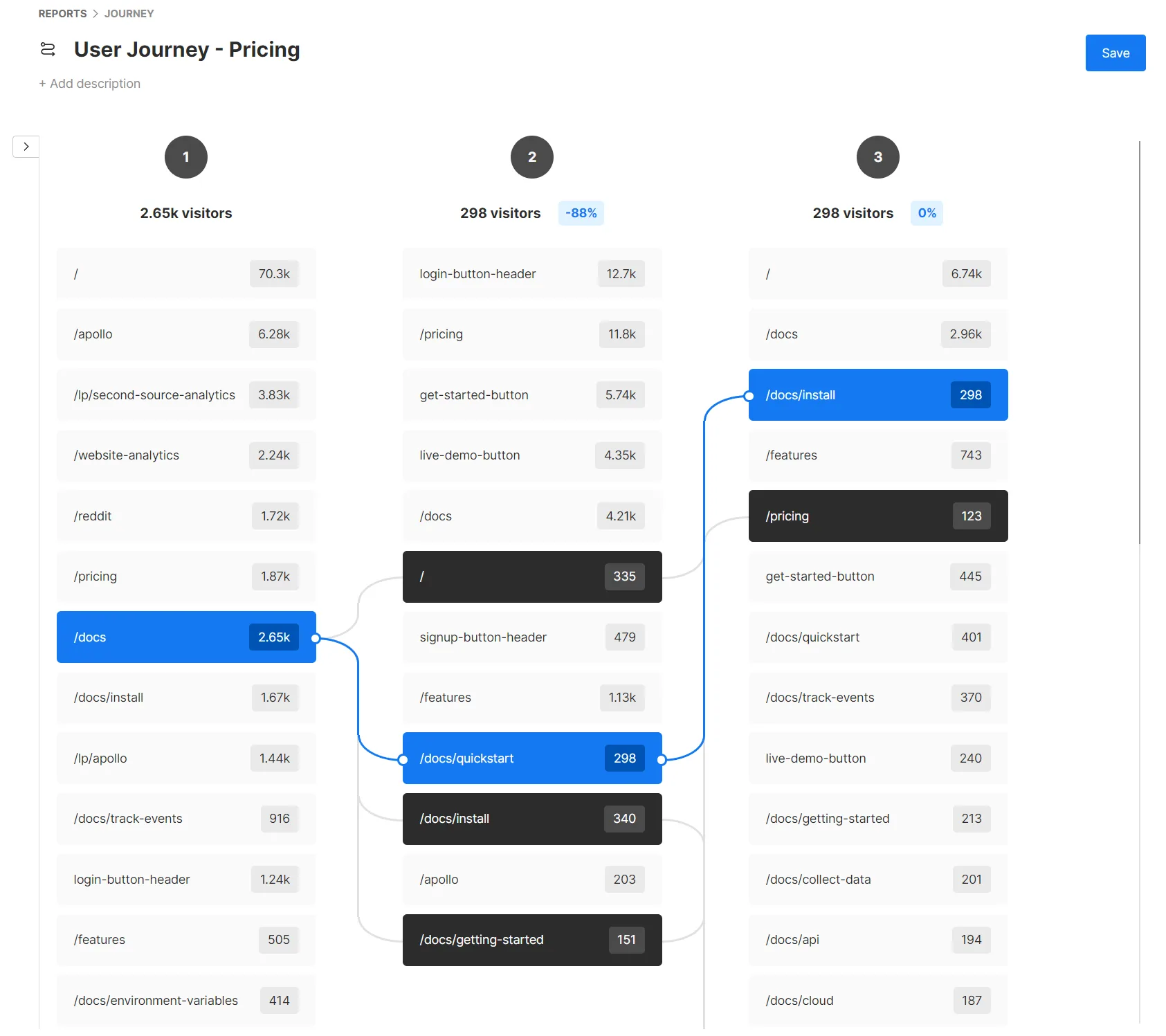
The Journey report is a visualization tool that maps the paths users take as they interact with your website. It gives product teams a detailed understanding of user behavior, allowing them to:
- Identify common navigation patterns
- Discover unexpected user flows
- Pinpoint areas of friction or drop-off
Whether you want to see all user paths or focus on specific pages or events, this report helps you identify areas for product improvement and optimize your website's performance.
Since Umami works on your websites and web-based products, don't be surprised when the marketing folks ask for access to build their own Journey reports. Umami is designed to be a tool for all teams within your organization.
Journey Report Key Features
To get the maximum benefit out of the Journey report, it's recommended that you have custom events set up on your product beforehand. While you can build journeys using just URLs, custom events allow for more granular analysis of user actions.
- Flexible Path Analysis: Analyze user journeys with 3 to 7 steps, allowing you to examine even nuanced flows.
- Start and End Step Definition: Define specific start and end points, focusing on particular conversion paths or user flows.
- Visual Path Exploration: Interactive visualizations let you review where users start, where they drop off, and where they end up.
- Drop-off Analysis: Easily identify where users leave your desired path, with percentage breakdowns at each step.
There is no limit to the number of Journey reports you can build in your Umami dashboard, so you can have one for each key user flow you're trying to understand and optimize.
Use Case: Optimizing Onboarding Flow
Product teams need to understand how new users move through their onboarding process.
Setup
- Define the key steps in your onboarding process.
- Create a Journey report with these steps, using URLs or events to represent each stage.
- Set the start step as the initial onboarding page or event and the end step as the completion of onboarding.
Analysis Approach
- Identify the most common paths users take through onboarding, which might reveal unexpected behaviors or preferences.
- Pinpoint where the highest drop-offs occur, indicating potential pain points or areas of confusion.
- Compare the paths of users who complete onboarding successfully versus those who don't, to understand what differentiates these groups.
- Analyze how changes to the onboarding flow impact user paths and completion rates over time.
Using the Journey report this way can help you reduce drop-offs and improve the new user experience.
Use Case: Conversion Path Analysis
For teams focused on improving conversion rates, the Journey report reveals the paths that actually lead to conversions.
Setup
- Define the key stages in your conversion process (for example: product page view, add to cart, checkout initiation, purchase completion).
- Create a Journey report with these stages as steps.
- Set the start step as a common entry point and the end step as the final conversion event.
Example Implementation
Let's say you're analyzing the conversion path for an e-commerce website. You might set up the following Journey report:
- Start Step: Homepage URL or 'Session Start' event, or maybe a paid search landing page
- Intermediate Steps: Product page URL, 'Add to Cart' event, Checkout page URL
- End Step: 'Purchase Complete' event
Since the Journey report allows for up to 7 steps, you should be able to analyze even the most nuanced journeys.
Analysis Approach
- Identify the most common paths that lead to successful conversions.
- Analyze where potential customers are dropping off in the purchase process.
- Compare the paths of converting users versus non-converting users to understand key differences.
- Examine how marketing campaigns or product updates impact user journeys and conversion rates.
Use Case: Feature Discovery and Usage Patterns
For teams looking to understand how users discover and engage with key features, the Journey report can help.
Setup
- Identify the key features you want to analyze.
- Create events or use URLs that represent engagement with these features.
- Set up a Journey report with a broad start point (like the app homepage) and use feature engagement as intermediate or end steps.
Analysis Approach
Suppose you work at a SaaS company and want to understand how users discover and engage with a new feature. You could use the Journey report to:
- Analyze the most common paths users take to discover the new feature.
- Identify which other features or pages often lead users to engage with it.
- Examine the sequence of actions users typically take after discovering the feature.
- Compare the journeys of power users versus casual users to understand how discovery and usage patterns differ.
This lets you make more informed decisions about feature placement, user education, and product layout to encourage adoption.
Complementary Reports in Umami's Customer Journey Analytics Suite
While the Journey report provides a comprehensive view of user navigation, Umami's customer journey analytics capabilities extend beyond this single report:
Retention Reports: Measure product stickiness and user return rates
Retention reports help you understand how well your product keeps users engaged over time, allowing you to track retention rates, identify factors contributing to churn, and measure the impact of new features on retention.
Funnel Reports: Analyze and optimize your conversion processes
Funnel reports focus on specific sequences of page views and events that lead to business outcomes. They let you visualize conversion rates at each step, identify drop-off points in critical flows, and A/B test different configurations.
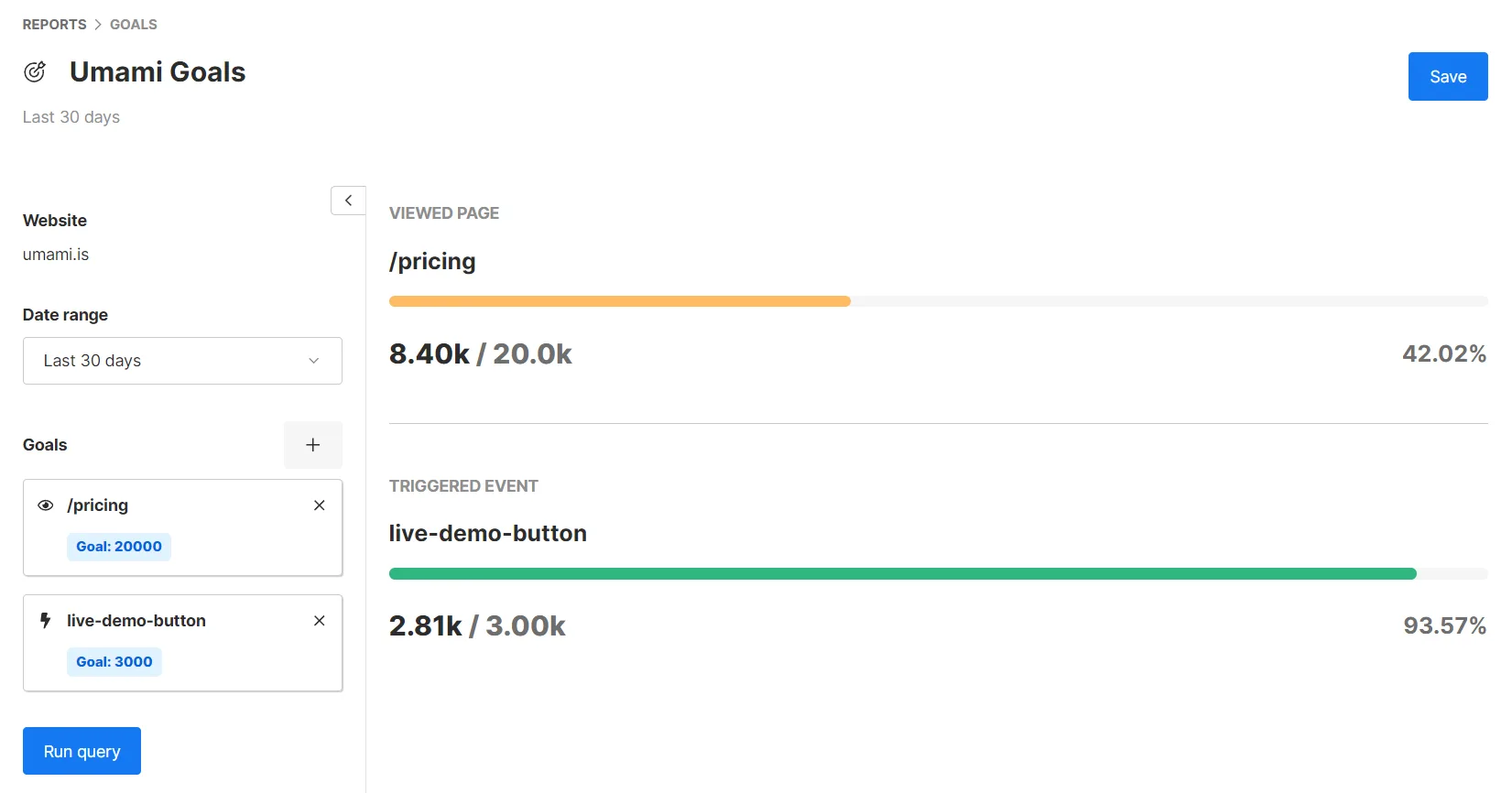
Goals Reports: Track progress towards specific business objectives
Goals reports allow product teams to set and monitor progress toward key performance indicators, measure the impact of product changes on completion rates, and align product metrics with broader business objectives.
Integrating Journey with Other Reports
The power of Umami's customer journey analytics suite lies in combining insights across these reports. For example:
- Combine Journey report data with Retention report data to identify which paths lead to higher long-term engagement
- Use Funnel report data alongside Journey data to understand the alternative paths users take when dropping out of a funnel
- Correlate Goals report data with Journey data to optimize the paths that lead to key business outcomes
Implementation and Best Practices
These reports come out of the box, providing immediate access without complex setup. To make the most of them, product teams should:
- Define clear objectives for what they want to learn about user behavior
- Regularly review and analyze data from all report types
- Use insights to inform product decisions and measure the impact of changes
Even if you already have analytics, Umami can be a valuable complementary tool. It works alongside existing solutions, increasing data confidence and providing a backup during outages. By setting up parallel tracking for key user paths and comparing results between Umami and your other platform, you can validate data accuracy and identify blind spots in your tracking. There are many benefits to having multiple analytics tools in place.
If you're a founder looking for concrete starting points, we also wrote up five ways startups can use the Journey report.
Ready to enhance your customer journey analytics? Try Umami today, or let us know if we can answer any questions by contacting us at [email protected].