Understanding the Breakdown Report
When you need to go into “research mode” to deeply understand the who, what, when, where, why, and how of the users engaging with your website or app, the Breakdown report is a great place to start. The Umami Breakdown report allows teams to segment data in practically any way to help uncover insights which can in turn, drive product strategy and improvements.
The Breakdown report stands out for its flexibility and depth, as it helps you discover the nuances of user interactions with your product or website. Whether you're looking to optimize user flows, identify high-value user segments, or validate product hypotheses, the Breakdown report provides the granular data you need to make informed decisions.
It is flexible enough to help the marketing team analyze the marketing website and their campaigns; the product team can analyze the actual app and everything else inbetween.
Key Features
Let's review the features of the report:
- Flexible Data Segmentation: Segment your data using various fields, including URL, page title, referrer, query parameters, OS, device, country, region, city, and host.
- Multiple Metric Focus: Analyze visitors, views, bounce rate, and visit duration to get a comprehensive understanding of user behavior.
- Advanced Filtering Options: Apply filters to focus on specific subsets of your data, supporting operations like "Is," "Is not," "Contains," and "Does not contain."
- Customizable Date Ranges: Set specific date ranges for your analysis, allowing for trend identification and period-over-period comparisons.
- User-Friendly Interface: Quickly create, save, and modify reports without technical expertise.
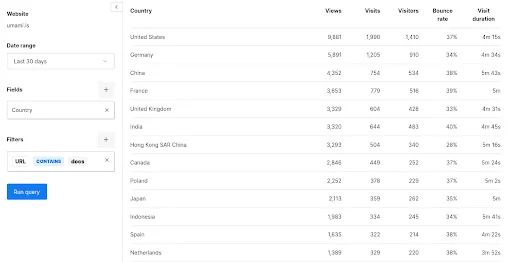
Let's move on to some use cases that demonstrate how teams can leverage the Breakdown report to drive meaningful improvements and strategic decision-making.
Use Case Example: Analyzing User Engagement by Traffic Source
Understanding how different traffic sources impact user engagement can help optimize your efforts and improve overall user experience.
Setup:
- Select Referrer under Fields to segment your data by traffic source.
- Apply Filters to focus on specific time periods or user segments.
- Analyze metrics like bounce rate, visit duration, and page views.
Analysis Approach:
- Compare engagement metrics across different traffic sources. Currently, all referrers are in the form of URLs (i.e., Google.com, Bing.com, facebook.com, etc) and you wont see “organic”, “paid”, “social”.
- Identify which sources bring in the most engaged users.
- Examine how engagement from different sources varies across different user segments.
Actionable Insights:
- Allocate marketing resources to the most effective traffic sources or revise strategies for traffic sources that are unexpectedly showing poor performance.
- Customize landing pages or user experiences based on the traffic source.
- Develop strategies to improve engagement from underperforming sources.
Use Case Example: Content Performance Analysis by URL Structure
Analyzing content performance based on URL structure can surface which types of content resonate most with your audience. For example, the Breakdown report can help you analyze your entire Blog or Docs section on the aggregate.
Setup:
- Select URL from the Fields drop-down to segment your data by content type or category.
- Apply filters with "Contains" or "Starts with" operators to group similar content. I.E., “URL Contains blog” if all of your blog posts have the word blog in the URL.
- Analyze metrics like page views, average time on page, and bounce rate.
Analysis Approach:
- Compare performance metrics across different content categories.
- Identify top-performing content types or themes.
- Analyze how content performance varies across different user segments or devices.
Actionable Insights:
- Focus content creation efforts on the most engaging topics or formats.
- Optimize underperforming content based on insights from successful pages.
- Tailor content strategy for different user segments or devices.
Use Case Example: Geographical Performance Analysis
Understanding how your product or website performs across different geographies can be really interesting data which can, in turn, help inform other strategies such as paid advertising, events, and more. For instance, maybe your content is really popular in Germany, this could suggest your team should test the German market.
Setup:
- Use the country, region, and city in the Fields drop-down to segment your data by location.
- Apply filters to focus on specific geographical areas or compare multiple locations.
- Analyze metrics like user engagement, conversion rates, and feature adoption across different locations.
- Use the URL filter to understand which types of content or individual pieces of content resonate across the different geographies.
Analysis Approach:
- Compare key performance metrics across different countries, regions, or cities.
- Identify high-performing and underperforming geographical areas.
- Analyze how user behavior and preferences vary by location.
- Examine the correlation between geographical location and other factors like device usage or traffic sources.
Actionable Insights:
- Develop location-specific marketing strategies or product features.
- Prioritize localization efforts for high-potential markets.
- Optimize content or user experience based on regional preferences.
- Identify and address performance issues that may be specific to certain locations.
- Consider sponsoring an industry event in that location
Use Case Example: Performance Optimization Across Devices and Platforms
We live in a multi-device world and ensuring a consistent and optimized experience across all platforms is a challenge, but expected. The Breakdown report can help you identify and address performance issues specific to certain devices or operating systems.
Setup:
- Segment your data by device type and operating system by selecting Devices in the Fields drop-down.
- Use bounce rate and visit duration as key metrics for performance analysis.
- Apply filters to focus on specific pages or features that are critical to your product's success.
Analysis Approach:
- Compare bounce rates and visit durations across different devices and operating systems.
- Identify any significant discrepancies in performance metrics between platforms.
- Analyze user paths and feature usage patterns on different devices.
- Examine how performance metrics correlate with conversion rates or other key business metrics.
Actionable Insights:
- Prioritize optimization efforts for devices or operating systems with poor performance metrics.
- Identify features or pages that may need redesign for better cross-platform compatibility.
- Develop platform-specific strategies to improve user experience where necessary.
- Use insights to inform responsive design decisions and ensure a consistent experience across all devices.
- Adjust paid advertising campaigns. For example, if mobile performs poorly, maybe less of your budget should go to mobile.
By leveraging these filtering and segmentation capabilities of the Breakdown report, you can double-click into user behavior across different dimensions of your product or website.
The Umami Breakdown report is one of the deepest reports that Umami has to offer both in terms of features and your ability to go really far beneath the surface into user activity. It allows you to segment and filter your data in highly specific ways that can flex and adapt to any product, website, or use case. Use the report's features to drill down into your data, validate or challenge your assumptions, and uncover unexpected patterns or opportunities.
Umami can run alongside your existing analytics tools as a second data source to help you confirm what you see from other platforms. By setting up parallel tracking for key metrics and regularly comparing results between Umami and your other analytics tools, you can validate data accuracy, identify potential blind spots in your tracking, and reinforce the validity of your findings. This approach increases your confidence in the data. It can lead to important discoveries about your tracking implementation or user behavior that might have been missed with a single analytics solution.
The Breakdown report is included in all Umami plans and can be found in the reports section of your Umami dashboard. It is an accessible and valuable tool for teams of all sizes. If you have any questions about how to best leverage the Breakdown report for your specific needs or how to integrate Umami into your existing analytics stack, don't hesitate to contact our support team at [email protected].